11 Best Notion Templates for Beginners to Get Organized

Getting organized can feel overwhelming when you’re new to Notion. With so many pages, databases, and planning options available, it can be difficult to know where to begin. The good news is that you don’t need to build an entire productivity system from scratch.
Notion templates provide a ready-made starting point for organizing tasks, habits, notes, projects, study plans, and personal goals. Whether you want a simple daily planner or an all-in-one life dashboard, the right template can help you get started with less setup.
In this guide, we’ll explore 11 Notion templates for beginners, including life planners, minimalist dashboards, creative planners, student planners, and template bundles. Each option serves a slightly different purpose, so you can choose one that fits your routine and preferred planning style.
11 Best Notion Templates for Beginners to Get Organized
These templates cover several approaches to personal organization. Before purchasing, check each product page for screenshots, included features, setup instructions, and any requirements.

1. Notion Life OS Template
The Notion Life OS Template is an all-in-one dashboard option for people who want to bring different parts of their lives together. It’s described as covering tasks, habits, notes, and projects, making it a useful starting point for beginners who prefer one central workspace instead of several separate tools.
Best for: Beginners who want to organize tasks, habits, notes, and projects in one place.
Explore Template
2. Minimal OS – Notion Life Planner
If you prefer a minimalist approach, this life planner is described as bringing together a to-do list, weekly planner, habit tracker, and vision board. These types of tools can help you review your priorities and maintain a clearer overview of your plans without making your workspace feel unnecessarily complicated.
Best for: Beginners who like simple layouts and want to organize weekly tasks and personal goals.
Explore Template
3. Notion Dashboard Life Planner Template
This dashboard-style planner is described as covering tasks, goals, finances, habits, and journaling. It may appeal to people who want a broad personal overview and prefer accessing different planning areas from a central dashboard.
Best for: Beginners who want to explore an all-in-one personal organization dashboard.
Explore Template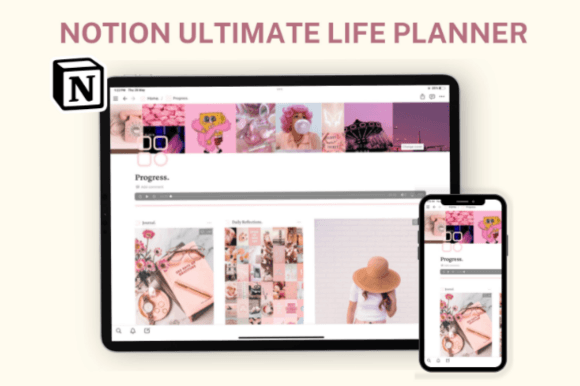
4. Notion Life Planner
This life planner is described as helping organize everyday tasks, morning and evening routines, journaling, and budgeting. If you want to combine practical planning with personal reflection, it may be worth comparing with simpler daily planners.
Best for: People who want to organize daily routines alongside personal notes and budgeting.
Explore Template
5. Notion Creative Planner
A creative planner can be a helpful starting point if you want to organize ideas and make room for personal projects. This template is described as supporting creative goals, journaling, monthly planning, and habit tracking, offering several ways to bring structure to your creative routine.
Best for: Creative beginners who want to plan projects, record ideas, and track routines.
Explore Template
6. Notion Life Planner with Visual Dashboard
If you prefer a visual overview of your responsibilities, this planner is described as combining tasks, a calendar, habits, goals, and notes. A structured dashboard may help you see your planning areas at a glance. Review the product preview to decide whether its layout suits your preferences.
Best for: Beginners who prefer visual organization and a structured interface.
Explore Template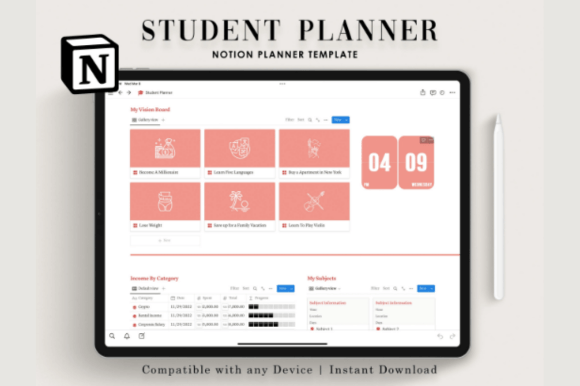
7. Notion Student Planner
Starting with Notion as a student can be easier when your workspace has a clear purpose. This student planner is described as covering daily tasks, study planning, a calendar, goals, and budgeting. It may be a useful option for keeping academic and personal responsibilities organized together.
Best for: Students who are new to Notion and want a dedicated study and planning workspace.
Explore Template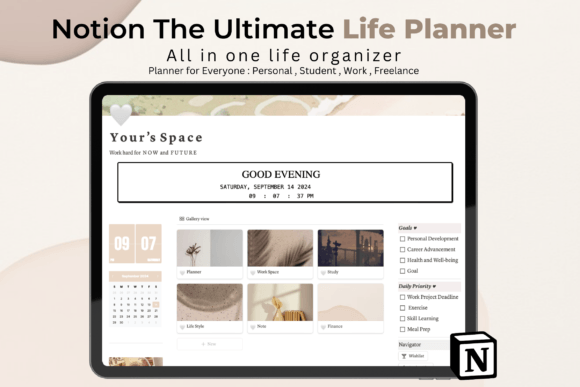
8. Notion the Ultimate Life Planner
This planner is described as covering daily, weekly, and monthly planning, as well as study, work, finances, and personal goals. If you want a broad system for different areas of life, check the included sections and compare them with the tasks you actually need to manage.
Best for: Beginners who want to explore a comprehensive planning structure.
Explore Template
9. Personal Home Dashboard Notion Template
A home dashboard can provide a central place to start your planning. This option is described as including a task list, project planner, meal planner, goals, and trackers. The supplied listing describes it as free, but check the current product page for the latest price and availability.
Best for: People who want a central dashboard for everyday tasks and personal planning.
Explore Template
10. Life Planner Notion Template
This option focuses on planning tasks and organizing your schedule across different time frames, from days and weeks to months and years. It may suit beginners who want a straightforward starting point for managing their calendar and keeping track of upcoming responsibilities.
Best for: Beginners who want to organize their schedule and plan ahead.
Explore Template
11. 20 Notion Templates Bundle
If you’re not sure which planning style works best for you, a bundle can give you several formats to explore. This bundle is described as including daily planning, task tracking, habit tracking, life planning, and other templates. Check the listing to confirm the full collection and current terms.
Best for: Beginners who want to compare different types of planning templates.
View BundleHow to Choose Your First Notion Template
You don’t need the most complex template to get organized. The right choice is one that fits your needs and feels easy enough to use regularly. Consider these points before deciding.
1. Identify your main goal
Start by deciding what you want to organize first. It might be daily tasks, study deadlines, habits, personal goals, creative projects, or several areas of your life. A clear goal makes it easier to narrow down your options.
2. Choose a layout that feels manageable
A minimalist planner may feel less overwhelming if you’re completely new to Notion. If you already know that you want a central dashboard with multiple planning areas, an all-in-one template may be a better fit. Check the screenshots before choosing.
3. Think about your daily routine
Consider when and how you will use the template. If you plan your day each morning, look for a layout that makes daily tasks easy to find. If you mainly want to manage assignments, a student-focused planner may be more appropriate.
4. Review what’s included
Product names don’t always tell you every detail. Read the description, look through the preview images, and check the included pages and any setup instructions. This is particularly important when comparing individual templates with bundles.
5. Avoid buying more than you need
A large bundle may seem appealing, but it isn’t automatically the best choice. If you only need a daily planner, an individual template might be simpler. Choose based on usefulness rather than the number of pages or templates included.
Tips for Getting Started with Notion
Keep your first setup simple
Start with the pages and sections you need most. You can customize your workspace later as you discover which features help you stay organized.
Focus on consistency, not perfection
Your workspace doesn’t need to look perfect to be useful. A simple checklist that you regularly update can be more practical than a complex dashboard you rarely open.
Make the template your own
Once you’re comfortable with the basics, adjust labels, remove unnecessary sections, and organize pages in a way that makes sense to you. A template is a starting point, not a set of rules you must follow exactly.
Review your system regularly
After using your template for a while, consider what is working and what feels unnecessary. Simplifying your workspace can help keep it useful as your routines and priorities change.
Frequently Asked Questions
Is Notion beginner-friendly?
Notion can be approachable for beginners when you start with a specific purpose and a simple workspace. A template can provide an initial structure so you don’t have to design every page yourself.
Which Notion template is best for beginners?
It depends on what you want to organize. An all-in-one life planner may suit people who want one central workspace, a minimalist planner may feel easier to navigate, and a student planner may be better for academic tasks. Compare the included features before choosing.
Should I choose a minimalist planner or an all-in-one dashboard?
Choose a minimalist planner if you want to focus on a few essential tasks. An all-in-one dashboard may be more suitable if you want to bring several areas of your life together. You can always expand your setup later.
Can I customize a Notion template?
Templates are generally intended to provide a starting structure that you can adapt. Check the product description for any specific instructions or limitations, then adjust the workspace to fit your personal preferences.
Is a Notion template bundle worth it?
A bundle may be useful if you want to explore several planning formats or organize different parts of your life. If you only need one specific tool, an individual template may be easier to manage. Review the bundle’s contents and current price before purchasing.
Do I need to use every feature in a template?
No. Start with the features that help you solve your immediate organizational needs. You can ignore or remove sections that don’t fit your workflow and explore additional features when you’re ready.
Final Thoughts
Getting organized with Notion doesn’t have to be complicated. A ready-made template can help you start planning your tasks, tracking habits, managing studies, and keeping personal goals in view without building a system from scratch.
The best choice is the one that fits your routine and feels easy to maintain. Explore the 11 templates above, compare their layouts, and begin with the option that addresses your biggest need. You can always customize and expand your workspace as you become more comfortable with Notion.
You may also like:
- 20 Best Notion Templates for Productivity and Organization
- 13 Notion Templates for Smarter Planning and Productivity
- 19 Aesthetic Notion Templates to Organize Your Life
- 14 Notion Templates for Wellness, Self-Care and Mindfulness
- 25 Best Notion Templates for Freelancers and Businesses
- 10 Best Notion Templates for Students and Study Planning